Accordance crashed

After Accordance 14.08 crashed, I was unable to open. After reinstalling Accordance, I now cannot load my purchases with Easy Install
-
Is there a phone number to call?
0 -

There used to be. I"m not finding it quickly. This article provides an email address to use: https://support.accordancebible.com/hc/en-us/articles/35922193783963-How-can-I-contact-Accordance-Technical-Support
0 -

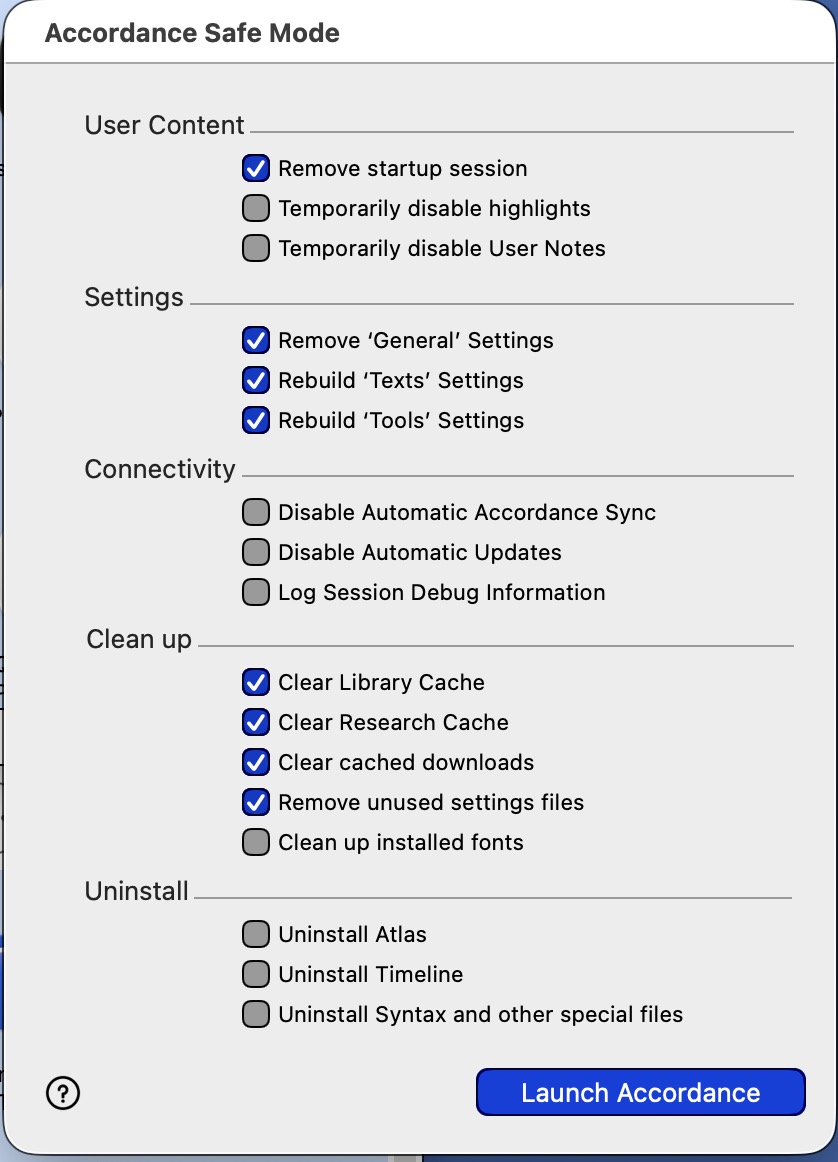
TRY THIS: Launch Accordance into SAFE MODE
(1) On your Mac with OS X, WHILE holding down the Option key, double-click the ACCORDANCE icon. Upon launch, the Safe Mode Screen will appear (the Windows build requires holding the ALT key or SHIFT and double-clicking the Accordance icon (one or the other; I can't recall at the moment).
(2) Select the Check-Boxes as shown below and then click the “Launch Accordance” Button
(3) You will be required to log back in, and this may remedy your issue. If this doesn't work, then reopen the SAFE MODE dialog box and select the third option at the top “temporarily disable User Notes”. Then reboot your machine and launch Accordance. (I had some issues with corrupted user notes that created a crash that sounds similar to the one you initially experienced.)
 0
0 -

Thanks Ronald, I found this helpful.
1 -

My app crashes as soon as I click on any of the tick boxes. Any thoughts?
0 -

Ralph Lee if you are on macOS Golden Gate, you are, like me, blocked on the new release of Accordance which is supposed to fix the dependency on the long-deprecated Cocoa class Accordance is using.
0 -
This is not for Mobile, but Ralph Lee download this to fix your Mac: http://accordancefiles1.com/products/Accordance14_Beta_installer.dmg
0
Please sign in to leave a comment.
Comments
7 comments