Perpetual .apref file write access error

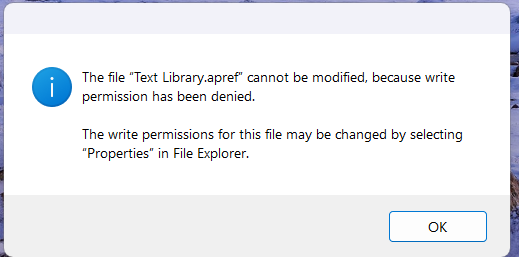
I'm using Accordance 14 on Windows 11. Every time I open (and sometimes when I close) Accordance, I keep getting errors for various .apref files. It's not just one file (below is one example). The errors say that it doesn't have write access for the files, but when I check the permissions for the files there is full permission including write access.
How do I fix this?
0
-

Try opening Accordance in Safe Mode and checking the boxes in the Settings section.
0 -
I already tried the safe mode instructions on this page:
Accordance Safe Mode – Accordance Support
It didn't work, unfortunately.
0 -
Rats! I was hoping that would fix it for you.
0
Please sign in to leave a comment.
Comments
3 comments