Highlighting Issues

I made a highlight schema from a construct search to show genitive absolutes. I then chose the “Highlight all hits” from the menu. It applied my schema to the hits in the window but it will not show up when I open up a new tab for the NA 28. I have the correct highlight file chosen and the enabled box is checked.
Am I missing something?
-

Are you sure that the Greek text related to the construct search is the NA28?
If you are, would you provide a screen shot of your construct so I can test and see if I experience the same thing?
0 -
Yes, I'm sure. I re-ran the search again in a separate workspace with the same results
0 -
Ok, so I (partially) corrected the issue. I had the scope set to a particular range. Once I removed it they showed up. I then had to go back to my original workspace, change highlighting pallets, and then switch back to my created one. After that, everything showed up. When I switched to another workspace and back the highlights were gone again. I tried the same method but no results. In fact, none of my highlights were showing up.
0 -
It would help me try to reproduce if you could provide a screenshot of your construct.
What operating system? If Mac, Intel or M chip?
What version of Accordance?
0 -
It is a Mac running Sequoia 15.5
I think it may be that highlights don't show up in your bible when they're in parallell with another? Not sure. Here was my Construct search: I had the “Search both directions” box checked.
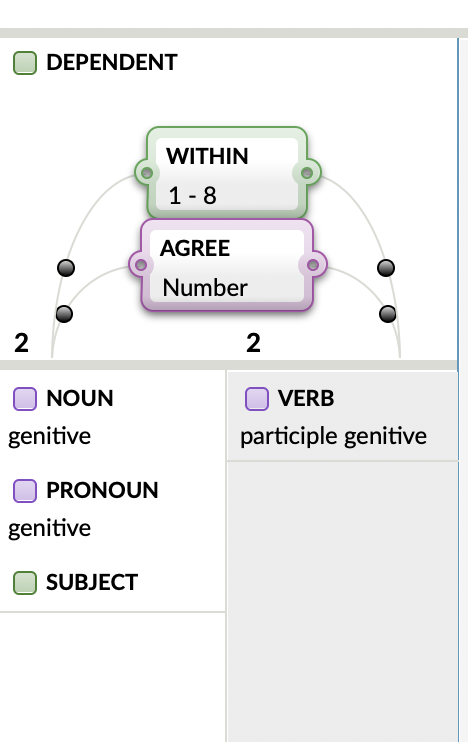
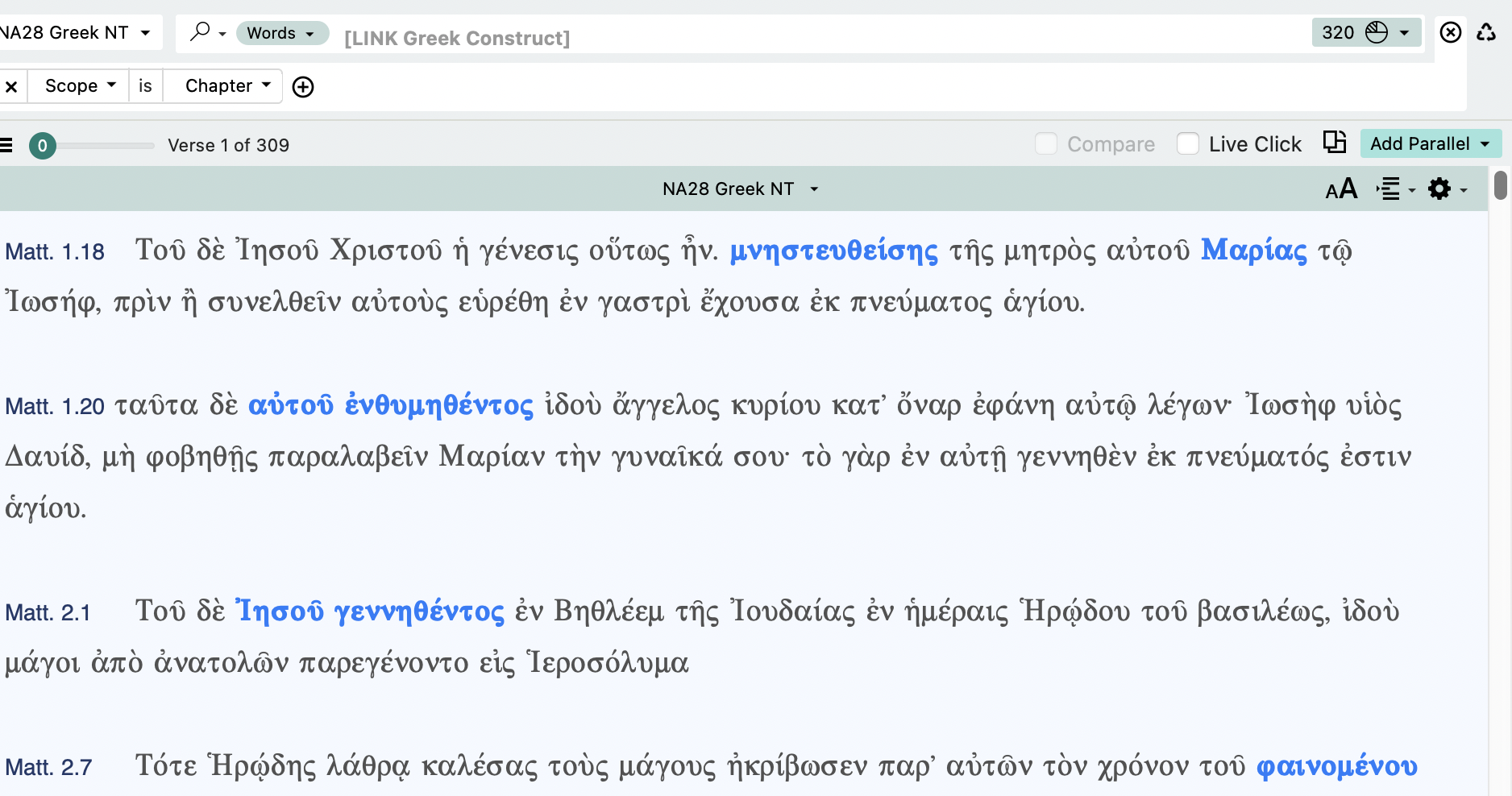 0
0 -
I finally had some time to play around with this…sorry it took me so long.
I set up the construct as you showed and then did “highlight all hits”. Those highlights showed up in any tab or pane I opened and set to the NA28. I did not try limiting the scope first, although it seems like you got that part figured out.
I not clear on the precise steps to reproduce this part:
I then had to go back to my original workspace, change highlighting pallets, and then switch back to my created one. After that, everything showed up. When I switched to another workspace and back the highlights were gone again. I tried the same method but no results. In fact, none of my highlights were showing up.
But I did try changing to other highlighting schemes/files, moving workspaces/etc, but every time I shifted back to the highlighting file i used to highlight the genetive absolutes, the highlights were still there.
I'm working on an intel Macbook running Ventura, and Accordance Aleph 14.0.11 (identical to “regular” Accordance 14.0.11).
0 -
I'm on the latest version of Mac, Sequoia 15.5, I believe. I'm also running the latest version of Accordance 14. I may have to take a GIF to see if I can reproduce the effect.
0 -
I not clear on the precise steps to reproduce this part:
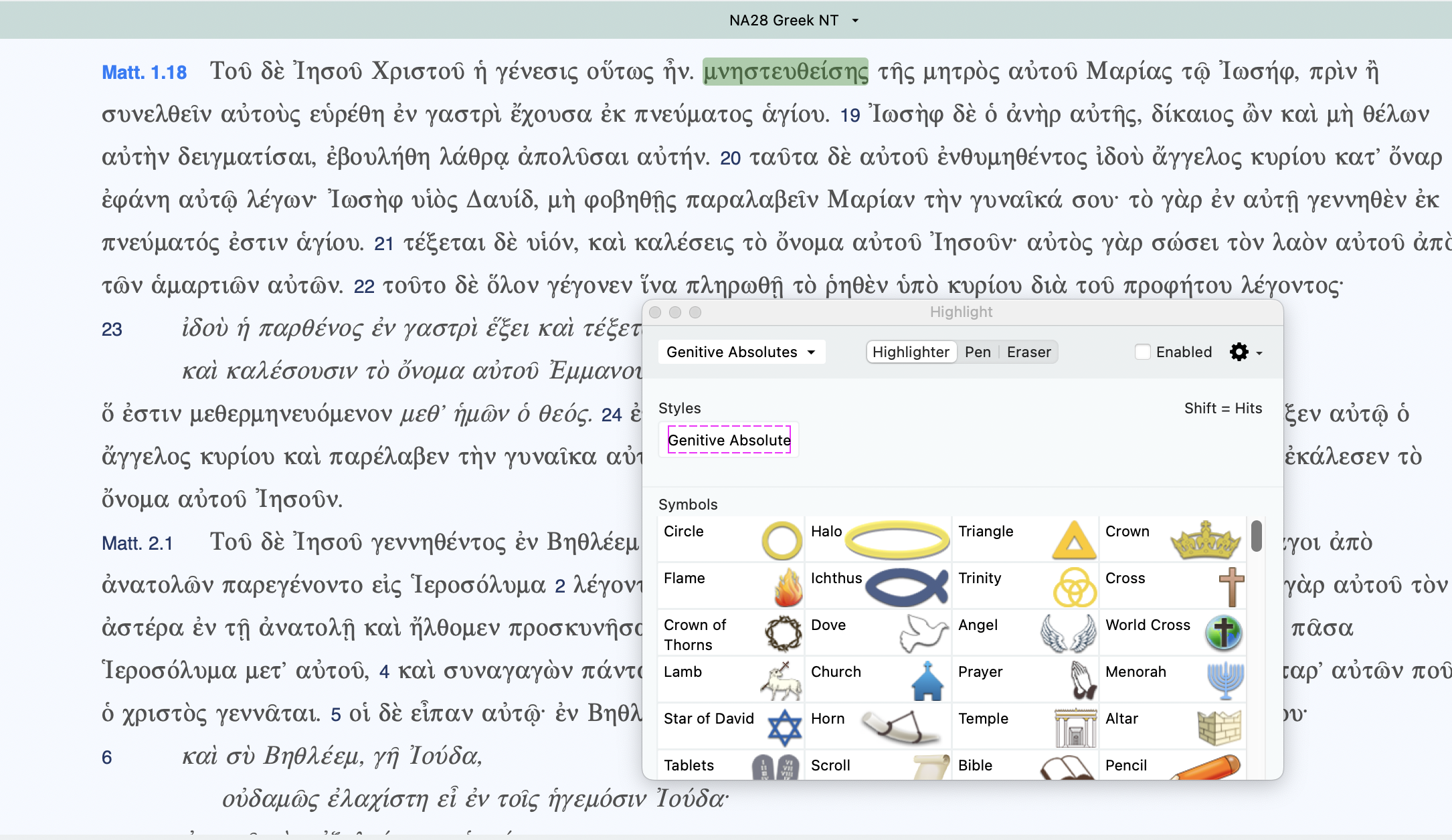
Here is a screenshot with the highlighting pallet open and a schema selected. As you can see NONE of the highlights are showing up.
Any time I close the program and reopen it, the highlights are gone
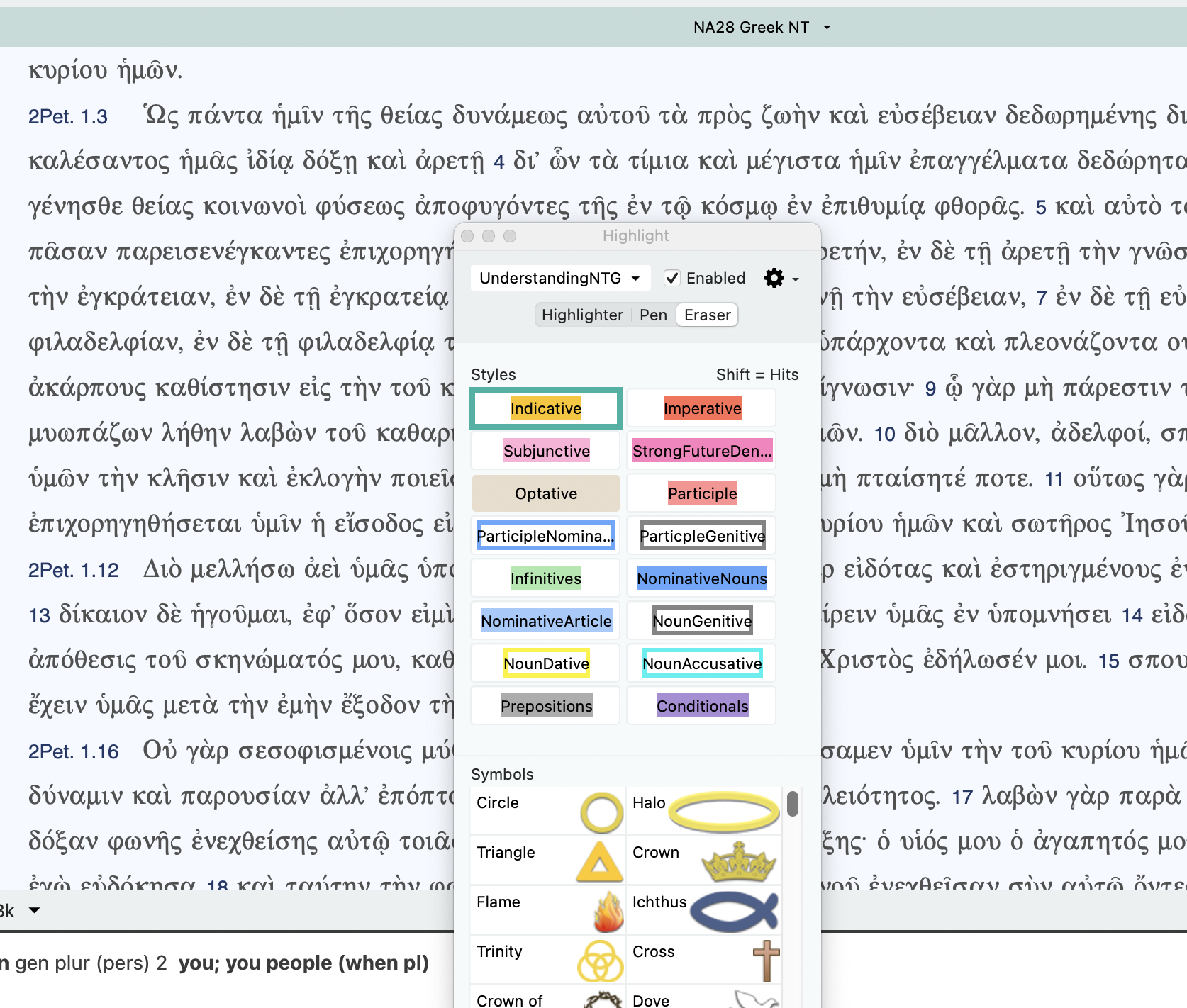 0
0 -
Thanks for the screenshot and further info. I can't reproduce this. But I am using a different Mac OS. I'm also on an Intel chip Mac, and I'm guessing you have a mac with an M chip.
0 -
Lorinda, yes I am using a Mac with an M1 chip. I tried again today several times with the same result. My highlights don't show up in tabs with the same bible open and they always completely disappear when I quit and reopen my program.
0 -
Lorinda Hoover, Accordance Bible , I've restarted in safe mode and cleared my caches but the highlights are still not showing up.
0 -

I'm not sure if our Tech Support team can troubleshoot this one or not, but you can try asking them.
0 -
There's a new “Create a Ticket” feature from this post. I am going to try it and send it to Tech Support to see how it works.
0 -
Tech Support sent it back here.
0 -
Accordance Bible, I'm not quite sure how to proceed from here, then. Tech support suggested doing something I'm already doing: posting on the forums.
I don't mean to sound like a kill-joy, but that's not much help at all.
0 -
I've told our support team you already posted here. Will see if we can find out your what your best option is on this one.
0 -
Mark Hoffman Is this one you could offer some guidance on?
0 -

Well, it's odd… On that screenshot, you have the eraser clicked, and when that happens, the highlight scheme should disappear. I'm on Windows, so maybe that's a Mac deal, but I don't think so.
Further, I see that you have the Enabled box checked. Unless you are indeed wanting to add or remove highlights from a scheme, I recommend you uncheck it. Any change you make gets fixed in the active scheme. So there may be something you did that overwrote the highlights in the active scheme.
I have finished the 2nd edition of my grammar that I'm hoping Accordance will turn into a module, and I've made some improvements.
Hmmm… I was trying to attach my latest highlight scheme, but I see that this new forum does not allow me to attach HLT files. (Accordance Bible : Is that something you can allow?)
0 -
The new community doesn't allow uploading attachments for security reasons (and they won't give us an option to do so). This workaround should work: https://support.accordancebible.com/hc/en-us/articles/35882217735579-Sharing-Attachments-with-the-Accordance-Community
0 -
Try this to get my latest Highlighting file. Remember to right click and Save As to the proper directory. (I.e., don't just click on it.)
0 -
I've unchecked the enable box and have the highlighter selected. When I do a highlight all hits, they show up for that session. When I quie and reopen Accordance, nothing shows on any of my highlights no matter which pallet Im using
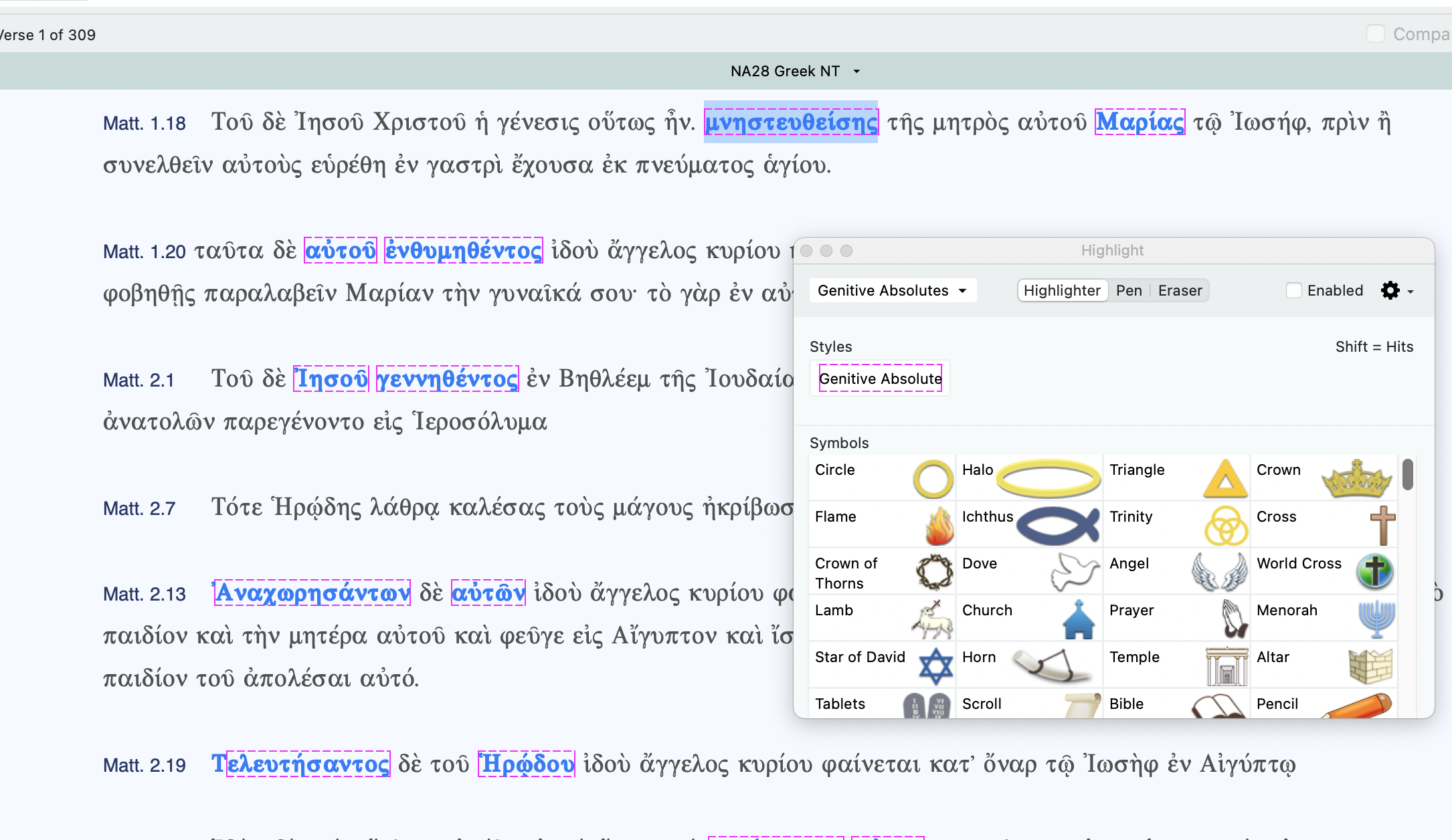
 1
1 -
Im not sure if I'm doing something wrong or if it is just a bug; not sure how to proceed from here.
0 -
Can you email your highlight file to the email address here? https://support.accordancebible.com/hc/en-us/articles/35992960306843-Accordance-Community-Direct-Messaging I can try it on my Mac and see if this is a bug or not.
0 -
Will do
0 -
I haven't received the file yet but will test once I do and keep you posted.
0 -
I haven't received the file yet but will test once I do and keep you posted
I did send it. I'll try again,
0 -
My email will not let me send it to the address provided. It doesn't recognize it as an authentic email address. Is there someplace Is there another email I can send it to?
0 -
Go ahead and reply back to the support ticket that Billy answered, attach it there, and put “Give this to Nathan. He is asking for this." I may see it before anyone else and grab it. If not, they can send it to me.
If that doesn't work, let me know and I'll email you.
0 -
I accidentallt sent it to sales. Let me try again
0 -
I just tested this. Your highlight file is working for me in 14.0.11, Sequoia 15.5, M2 MacBook Air, even if I quit and re-open Accordance.
I would try all of the Accordance Safe Mode instructions here:
https://support.accordancebible.com/hc/en-us/articles/35762401534875-Accordance-Safe-Mode
You may want to try Disabling Highlights, then try re-enabling it, to see if it resets it.
I would also make sure your security/privacy settings are OK, but yours probably are:
0
Please sign in to leave a comment.
Comments
32 comments