How to fix "Word Count Totals: Analysis"

I am doing work on Hebrew Hophal and Pual participles. When I search them, the Analysis pane works differently on each, respectively.
When I do a search on Hophal participles, it looks like this, and I click on “Analysis.”
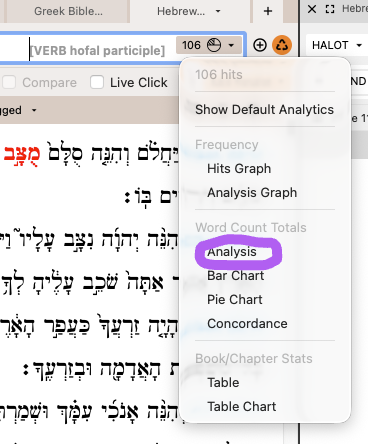
This opens a new pane. When I triple-click on a word, the results pane shows all the occurrences of that root. The analysis pane does not change.
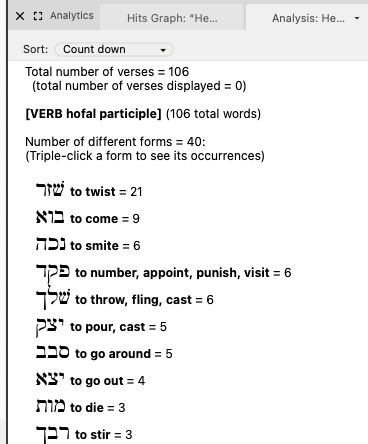
When I do the exact same operation with a Pual, I get a different result. When I triple-click on those words, the results pane changes. I no longer see all the roots that appear as a Pual participle, but a list of forms only of that root. I cannot return to the initial list of all roots unless I run the search over again. I would like the Pual results to act like the Hophal results.
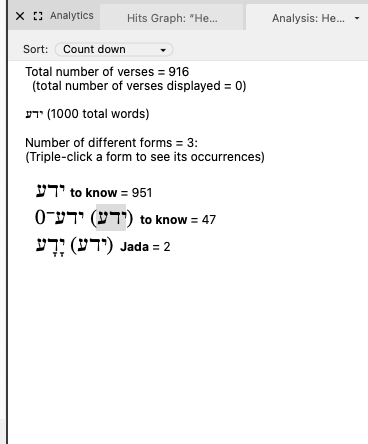
Why do these two analysis panes work differently?
-

Hi Rishard
I often find the triple click from the analysis a bit confusing
I have tried to reproduce this and I can …
I think the issue is around repeated searches - and having 2 analytics tabs open simultaneously.
as below, in your example
You have asecond analysis tab open in that window and if you have a second tab open then you longer see all the roots that appear as a participle, but a list of forms only of that root.
WEhn this happened I need to shut all my search windows and start again. - When working with a single analytics tab that I adjust each time then this coninues to work as you wish it to.
0 -
Thank you Tim Planche ! By changing the number of tabs in the search window, I wasn't able to change anything. This time I noticed a couple things:
1. All other stems work like I said the Pual is working (Niphal, Hiphil, Hitpael).
2. Now when I try the Hophal, it acts like those others. I can't get it to work the way I described the Hophal was acting in my original post.
3. When I open up a second tab in the analysis window, it automatically syncs to the other. So, If I have the original list in first anaylsis tab (eg, Pual participles), go to another search (eg, Hitpael participles) and a new analysis tab, and then return to the first analysis tab, the first tab is showing the new results (in my example, the Hitpael).
Any suggestions here? I simply want to triple-click and have nothing change in the analysis tab(s).
0 -
Hi Richard
I have had another look at this, and I can get it to perform the way you want it to in the Hophal and all other Binyaniym.
There have been occasionally times when it reverts to performing in the way you do not wish it to. Though I am not entirely certain what triggers this change in behaviour.
However, the problem resolves if I close all my BHS windows and open a completely fresh window to perform the “[VERB hofal participle] ” search.
Sorry, I can't be more specific and will be intrigued if others can explain this.
(in case this is a version issue I am running Accordance 14.1.12 on a 2022 M2 MacBook Air)
0
Please sign in to leave a comment.
Comments
3 comments