Syncing has been impossible for many months now

I have been a user of Accordance for 25 years. I have invested many thousands of dollars on my software and setups.
Over the last year I have had increasing sync problems with Mac OS and IOS. I have lost many months of work and now I am at a situation where I cannot sync with my MacOS version and my iOS version. All versions are up to-date as are OS systems on the computers and phone.
These problems are well documented on my emails with support.
What has been a tremendous tool has become useless to me now. I am not sure where to turn now?
-

I am having the same issue. Didn't realize until I just recently tried to sync macOS and iOS.
1 -

Same issue trying to sync a new iPad with Accordance on MacOS. What feedback did you get in your email correspondence with tech support?
Looks like this has been noted by others as well: https://support.accordancebible.com/hc/en-us/community/posts/49914430610971-Can-t-sync-with-Accordance-Mobile
1 -

I've been in contact with the Oak Tree software guys, and there's been no indication of when this disconnect will be restored. It seems they need some code from Apple to restore it.
1 -

Mike Wernick, thanks for checking and passing on that information!
1 -
I emailed Technical Support and received a helpful email back with a link to 14.2 beta. It has enabled me to start syncing my new mobile device. My syncing is still in progress, though, as the sync still hangs at some points during the install process. But, at least, 14.2 has recognized the new device.
1 -
This is how Accordance responded to me:
Hi Mike,We were sorry to hear of this issue.
There have been many issues in both Mac and iOS versions of ’26’.
As Apple continues to work toward merging the computer version with the iOS version they are making changes that disconnect it from the Accordance code that works with all of the previous Mac and iOS versions.
The Sync with Mobile device feature, while it is working for most instances, it does not work on certain newer devices.
There are several devices that won’t work. This is one of the highest priority bugs that is being worked on right now. This is the backup option for anyone who has had issues with Accordance Sync. It is being worked on right now.
We apologize for this inconvenience.
Thank you for your patience while our programmers continue to work out these issues.
Best wishes,
Billy
0 -
I received a similar email with some additional info:
There have been many issues in both Mac and iOS versions of ’26’.
As Apple continues to work toward merging the computer version with the iOS version, they are making changes that disconnect it from the Accordance code that works with all of the previous Mac and iOS versions.
The Sync with Mobile device feature, while it is working for most instances, does not work on certain newer devices.
There are several devices that won’t work. This is one of the highest priority bugs that we have now. This is the backup option for anyone who has had issues with Accordance Sync. It is being worked on right now.
We apologize for this inconvenience.
We do have Accordance 14.2 betas available now which are working to address this and other issues.
We have received positive results in some instances.
The iOS beta will be out soon as well.
I am sending a link to download the Accordance for Mac version in case you want to try it.
Please quit Accordance and run this beta. In the future when the actual release is out, you can keep the beta in case you ever need it again in the future.
You can run these side by side (but I only run one at a time). Run the beta until 14.2 is released and then run the release version and set the beta aside.
0 -

Can we get an update on this? Accordance is becoming increasingly less useful since I know I can't rely on highlights on one device to show on others. This certainly doesn't feel like a “highest priority.”
1 -
100% Accurate Carl. For their highest priority, there is no public statement.
1 -

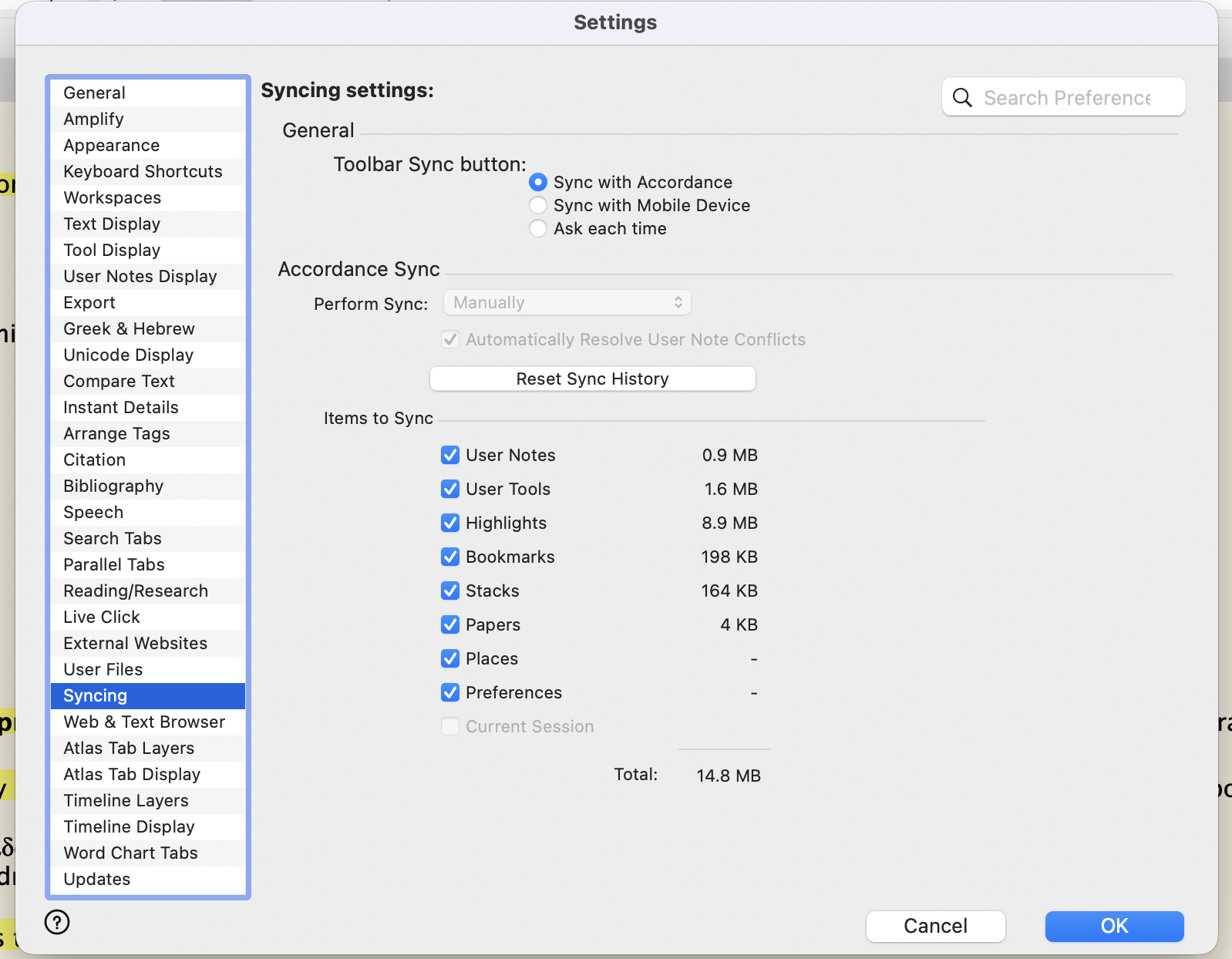
I have been syncing Acordance iOS26 with macOS 26 without any issues. Suddenly, I see highlighting in Accordance on macOS that does not show up on my iPad after syncing. I included a screenshot of my syncing settings from my macOS. From what I am reading, I see Accordance is aware of this issue, but no progress has been made. I've invested $1000s in Accordance, so this current problem isn't working for me or many others.
Any update would be appreciated.
0 -
Like you, I've been unable to sync for MONTHS. But after seeing your post, I thought I'd give it another try. I have Accordance v14.1.2. My MacBook Air M4 has OS 26.6.2 and my iPhone 16 has iOS 26.6.1. And for the first time, my MacBook “discovered” my iPhone!!!!! I started to sync 6 - 8 of my two-dozen or so texts at a time, and the process seemed to hang up. So I started over with one at a time, and had no trouble. I don't know what changed. I first emailed Accordance about this on Jan. 26, 2026, so it's been seven months today.
0 -
Glad to hear that, but still not working for me. What’s worse, I just noticed the iOS app hasn’t been updated in 9 (!) months. That’s crazy. I’m starting to wonder if Accordance isn’t going under… :(
0
Please sign in to leave a comment.
Comments
12 comments