Accordance unable to confirm ownership of BHS-T and HMT-W4 after getting new Macbook

I got a new Macbook running Sequoia and Accordance now can't confirm ownership of some important texts, so far I've noticed BHS-T and HMT-W4 are unable to load. Any help would be appreciated…
-

I've been able to resolve a similar situation by following these steps:
Make sure you are signed in under the account from which you make the purchases.
1. From the Library Pane select the BHS-T and the HMT-W4 and choose Remove Item … from the contextual menu or the gear menu at the bottom of the library. A dialog will confirm with “Move to Trash” or “Keep File.” Select “MOVE TO TRASH.”
2. Close and then relaunch the Accordance application.
3. Initialize the Easy Install … menu item in the Accordance menu (Mac OS) or the Utilities menu (Windows).
4. Re-download the BHS-T and HMT-4 text modules.
________________________
If this does not remedy the situation, I would suggest launching Accordance into SAFE MODE.
* On Mac this is evoked when holding down the option key IMMEDIATELY AFTER launching Accordance. believe on windows it is the SHIFT KEY immediately after launch. Start with CLEAR LIBRARY CACHE. Then repeat the above steps.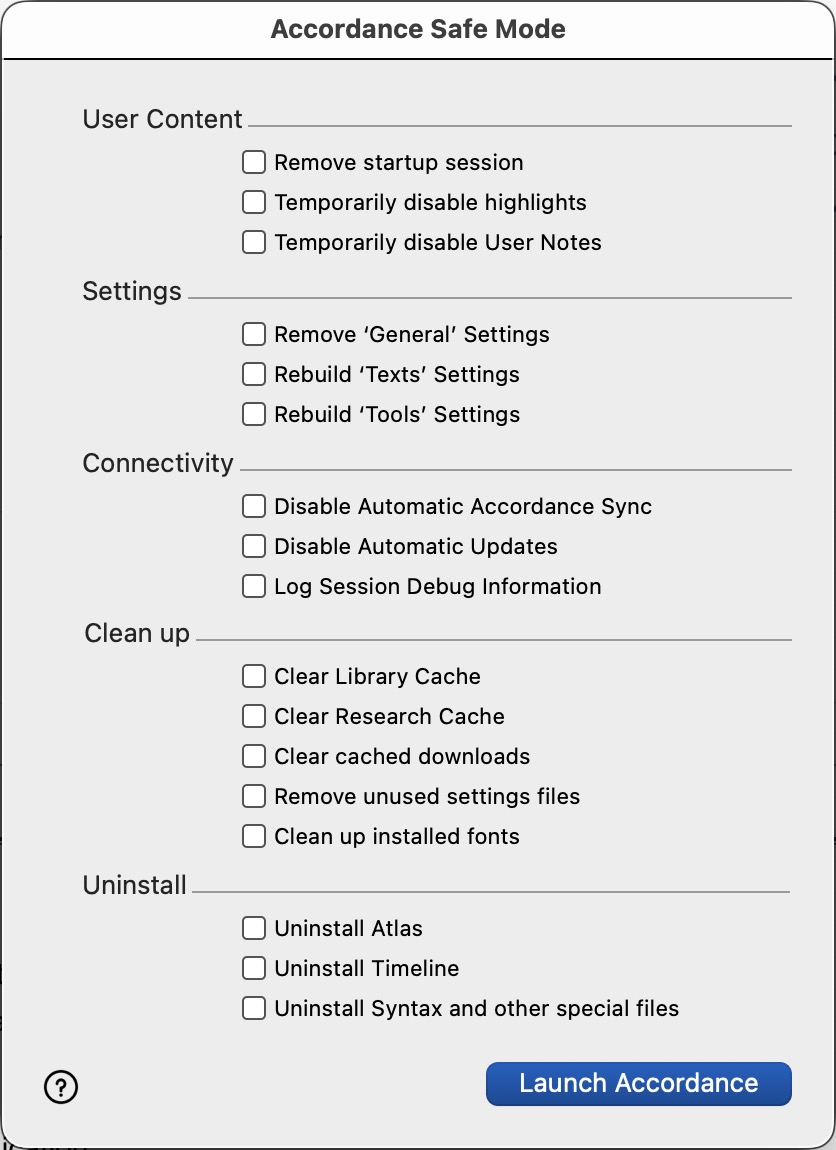 1
1 -
Hi Ronald, This sounds like a perfect solution to handling it…
0
Please sign in to leave a comment.
Comments
2 comments