(NOT) Enhanced Syncing

Are you all expecting us to recommend Accordance 14.1? It has clearly been expressed that the errors (exceeding allowable 50mb) are not sufficient.
I'm still grateful for the many features in Accordance but am puzzled at the perpetual lack of progress on this most requested feature.
-

The sync limit has been recently increased to 100mb. If you aren't seeing it, check for updates on your devices.
ETA: I think the iOS update increasing syncing size is still in Beta (in TestFlight), but it is clearly in the works.
0 -
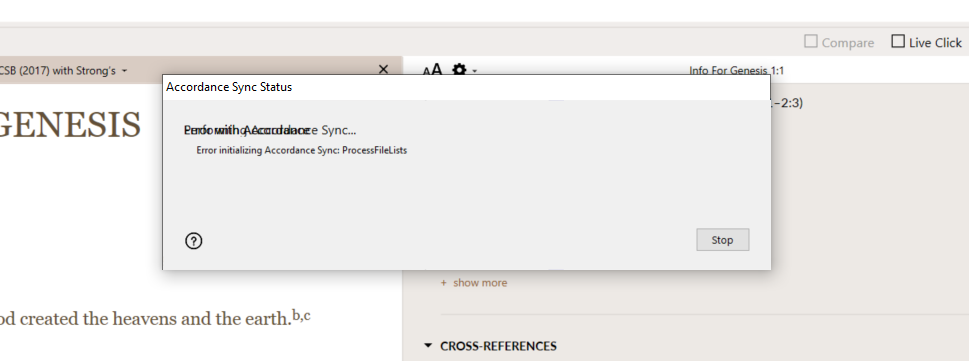
This has not been my experience. I'm on 14.1. A month ago I synced with Accordance. Now I get the 50 mb limit every time. On the PC at work, it's a scrambled error message each time.
Mac OS Tahoe 26.1
0 -
My apologies. The increased sync limit is still in (open) beta on desktop as well. I inadvertently jumped it ahead to released in my mind.
0 -
ok thanks for the information
0 -
14.11 installation has worked quickly and efficiently on my MAC, Ipad, and Iphone. It will not however, work on my work PC
It's been doing this since I upgraded to 14.1
Then today I upgraded to 14.11 and it still gives this error.
 0
0 -

I’m not able to sync, and while it is possible to reinstall the previous desktop version of Accordance (which supports Dropbox), older iOS apps are unavailable.
I’ve received many apologies for the failure of this “upgrade” but I sense either a final death and sinking of Accordance is coming or one more subscription that might provide minimal functionality.Maybe I should use a paper Bible again.
0 -
Byron,
It really is that frustrating. Syncing is not a breakthrough technology. Maybe they should ask AI to do it.
Thank goodness for robust paper Bibles! There are so many more alternatives, but I made the choice to buy many resources thinking that their reputation for quality would be worth the investment. I'm beginning to wonder, although I've learned so many shortcuts and workflows, I would hate to let it go.
0 -
Dan,
I bought Accordance when it appeared to be the best (and maybe the only) option for the Mac OS. I’m by no means a scholarly or power user. I’m a layman who wants to use technology when it will help me in my study. (I’m grateful for the tech that Johannes Gutenberg used to make the word readily available to the generations who followed him.)
User Notes are a great feature of Accordance but they’ve become almost useless. For several years I’ve not been able to create or edit a note in the iOS Accordance apps, so my workaround when I’m using a device other than my laptop was to take notes in the iOS Notes app and then copy and paste the notes into a User Note in Accordnace on my computer. Until Dropbox support was dropped, I would then sync to add the notes to my devices.
I don’t like the thought of the expense of investing in a new platform or spending the time it would take to manually move my notes to a new application—because I don’t think notes can be exported.
1 -

Byron, I've been using user notes on IOS for years and not had many problems, save syncing issues.
The latest version for IOS does have a bug which means to enter a user note you need to have the phone in landscape mode to see and edit the note. (Go figure) But doing this works. And I've found syncing works as long as you are under the 100mb limit.
I'm hoping the bug will be fixed soon, but things don't seem to happen too quickly with Accordance these days.
0 -
Any progress on this issue? My expectations are relatively low. If wireless sync is not possible, I've got a cable.
0
Please sign in to leave a comment.
Comments
10 comments