Feature request: Less antagonism toward alphabetizing resources

Why, in 2025, using one of the premier Bible software suites _in the world_ am I still forced to manually sort my modules alphabetically (and it's not even a quick process after a fresh install)? This continues to baffle me. What's more, it frustrates me to know that purchasing any new module means I need to re-sort by alpha. Why is this not an option that can be chosen? Surely it's not that difficult to code? I _think_ alphabetically. “I need the New Revised Standard for this. Let's see… where are the N's…? Oh, right, here one of them is, right between Z and G.” Please please please, for literally the love of all that's holy, provide an auto-alpha option for what I imagine is a not-insignificant portion of the user base that organizes alphabetically. (Or point me to it if it already exists)
And don't even get me started on the disaster that is the Settings screen…
PS Why can't I alphabetize the “Parallels” folder?
-

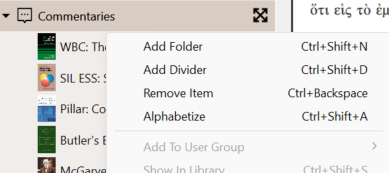
Maybe I'm misunderstanding the issue, but you should be able to right-click or command-click in any library folder and select “alphabetize.”
1 -

Well now, there really is an Alphabetize option in the contextual menu. And after the list has been sorted, I can manually drag items around if I want a resource or collection in a particular spot. Nice!
 0
0 -
Right, but it’s a manual step. Has to be done for the library… then has to be done for each folder itself… then has to be done again on Mobile. I spent 10 minutes the other day alphabetizing everything. It should take about 10 seconds (i.e. there should be an “auto-alphabetize” setting).
1
Please sign in to leave a comment.
Comments
3 comments