Quote as citation broken in 14.1.0

I have attempted several quote as citation copies to Word this morning after the upgrade and they all contain the strange “ instead of "

-
Additionally, I have noticed that quotes are not included at all when copying as citation is used with commentaries and superscript is not being removed.
Example:
This teaching is not false, but it is insufficient for perseverance in faith because it does not reveal the full sufficiency of Christ as the only Savior.35 In every generation there are those who profess the rudiments of the Christian faith without grasping the reality of Christ or pursuing the course of persevering faith. They follow their own way, recognizing neither their privileges nor their peril. Believers must embrace all that Christ is and has done for them. Thus the pastor urges his own, “Let us go on to maturity,” by appropriating the “perfection” provided by Christ so that we can persevere until the end. This maturity is not an ideal or a distant goal but the norm expected of a believer and the only means of perseverance.36Cockerill, Gareth Lee, The Epistle to the Hebrews. New International Commentary on the New Testament. Accordance electronic ed. Grand Rapids: Wm. B. Eerdmans, 2012.
0 -

Mike, the funny stuff at the beginning and end of the quotation represents curly quotes. Whatever program you are pasting into doesn't know how to deal with the curly quote marks surrounding your citation. If you copy curly quotes from the Mac to Windows or vice versa, you get that kind of thing because they don't use the same extended ASCII code to represent curly quotes.
As a temporary fix, you could change your markers for citations. Under the Accordance menu, select Settings. In the settings window, click on “Citations.” There you will see the type of quote marks currently in use. You can change them to straight quote marks. I think this will take care of the problem until a better solution comes along.
Blessings,
Kevin
0 -

I am able to reproduce this issue - I believe it is new to 14.1. The citation markers, etc are not saving/recalling correctly in all cases.
Thank you for the feedback!
0 -

I'm seeing this as well on my Mac. MacOS 26.0, Accordance 14.1, Pages 14.4. It wasn't happening prior to updating Accordance to 14.1.
0 -

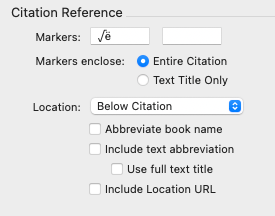
I am also seeing this bug. I've been using space-em dash-space for years with no problems.
The first time I did a copy this morning I got goofy characters. When I checked Preferences those characters were displayed, not the em dash. I corrected the prefix and saved preferences.
Upon reopening the Preferences, the Citation prefix was once again corrupted.
 0
0 -

I had the same problem (https://support.accordancebible.com/hc/en-us/community/posts/40911265110043-I-cannot-change-the-settings-in-Citation-settings).
After the update to 14.1 I decided to clean up my Accordance Folder in “Documents”. I've noticed that I had two accordance folders. One named “Accordance” and one named “Accordance files”. With a lot or duplicates here and there, old preferences files, etc. After I've removed the old files and put all what I wanted and was needed in one folder only, the problem disappeared.
it works correctly now.
Apple M4, Tahoe 26.0.10 -

Another example from 14.1.0 (Windows):
In earlier versions, I have set up a citation marker as follows:
On a Windows text editor, I use <shift><enter> to get a new line without triggering a new paragraph. Then I enter the alt code <alt>0151 to generate an em dash. I copy these two characters to my clipboard, then paste them into the marker box in the citation preferences.
Worked perfectly before:
3 Then God said, “Let there be light”; and there was light. 4 God saw that the light was good, and God divided the light from the darkness.
—Genesis 1:3-4 (CJB)Now when pasting a citation, the line feed works okay, but the em dash enters ÔøΩ, with a trailing space:
3 Then God said, “Let there be light”; and there was light. 4 God saw that the light was good, and God divided the light from the darkness.
ÔøΩ Genesis 1:3-4 (CJB)
Pierbattista's solution does not work for me.0 -

You've probably got enough information to track down this bug, but the same thing happens when using the Accordance Services on MacOS.
0 -

Just adding my voice to this. I used the services/Joe Weaks automation quite a bit and this is quite troublesome. Thanks
Edit: I went into settings and changed the markers for citation back to the quotation marks (") and it is now rendering perfectly on copy as citation. Fingers crossed and will update if this changes or corrupts again.
0 -

I have the same problem
Äú“Blessed are the poor in spirit, for theirs is the kingdom of heaven.‚Äù (Matt. 5:3 LSB)
0 -

Adding another voice to this issue. Using Accordance 14.1 on MacOS 26. The issue seemed to begin when I updated from MacOS 15. Also, it doesn't matter what program I am pasting into (Microsoft Word, Pages, Notes), the issue continually exists.
0 -

This bug has been confirmed by our team and should be fixed in the next update.
1 -
It has been one month. Please, when do you anticipate this next update? Since I spend hours in Accordance most days, with a lot of copying and pasting, I'm waiting to upgrade to Tahoe until this issue is fixed in Accordance. Thanks.
0 -
14.1.1 is currently finishing up its beta test period and should be available outside of beta within a week. It will address this issue.
0 -
That's awesome. Thanks a lot!
0 -
Thank you very much for the fix!
0 -
Thank you!
FYI, for anyone who temporarily switched over to the straight quote marks, here is some help to get back to the curly quotes:
opening double quote: Option + [closing double quote: Option + Shift + [
0
Please sign in to leave a comment.
Comments
17 comments