14.1.0 syncing
Answered
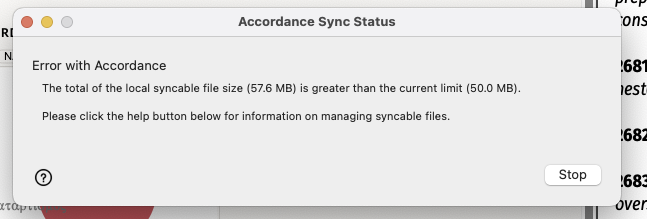
Sync is not working for me. I get the following alert window:
-

There was a limit of 50 mb on syncing (disappointing I know). I can’t even sync my user notes and highlights. I asked on another post if they had made a decision on increasing the sync quota. No answer has been given.
0 -

I got the same message. I went into settings>syncing and unchecked my highlights. It then synced.HOWEVER, I was under the impression that it synced your workspaces and themes that you chose as well. Am I missing something?
0 -

I am also getting this error. I think many of us likely have data that is over the 50MB size limit (which is way too small). I had to turn of syncing of all my user tools to get sync to work.
1 -
Me too…gonna need that increased!
1 -

What is stored in the Sync: highlighting, please?
On my main PC the Preferences Sync shows highlights occupy 176 MB. On my other PC they occupy 88 MB - haven't checked my portable (it is not on hand at the moment).
The sync worked fine after I unchecked highlights.
Thank you.
0 -
for me too. I assume that an iOS version that syncs with Accordance sync is coming soon? Otherwise, there is no point for me.
0 -
Now that I have synced once, I cannot make any changes to the sync: unclicking items in preferences does nothing; it still tells me I am exceeding the 50MB limit. I tried to reset sync history, had no effect.
0 -
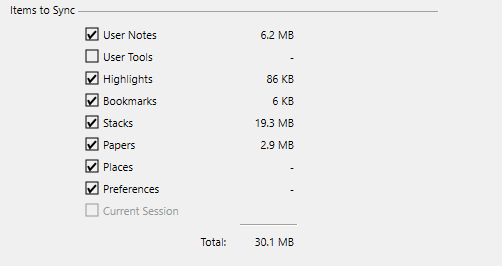
Gary Pauley I am wondering if you successfully synced something that was right at the 50MB limit. My initial sync attempt was way over and failed. When I unchecked user tools, I was sufficiently under 50MB and everything works (except that I cannot sync some very important custom user tools).
Is your total closer to 50MB?
 0
0 -
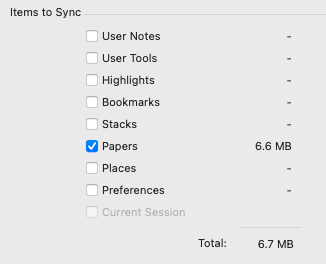
Well--originally I synced close to the 50MB, then I unchecked almost everything, got it down to 6.7MB, and it says that I am trying to sync 51.1MB. So I guess it is holding what I originally synced and I don't know how to change the contents of the original sync. I tried to “reset sync history”--but it did not work and is now greyed out.
 0
0 -

My User Tools alone are 134 MB. I will need to stay with Dropbox sync until there is a higher limit that will accommodate all of my files to be synced. Is there a date when we can expect a higher limit?
Thanks.
2 -

We haven't heard an update yet, but someone can followup here when we have it.
1
Post is closed for comments.
Comments
11 comments