Sync broken on Mac OS

I updated Accordance tot he latest beta (14.1.0b3). Good news, dark mode seems to work now.
Bad news, sync seems to have stopped working. I have quite & restarted Accordance multiple times, turned my computer on & off. all to no avail.
Mac mini 2023, M2 Pro, 16 gb memory, running Sequoia 15.6.1
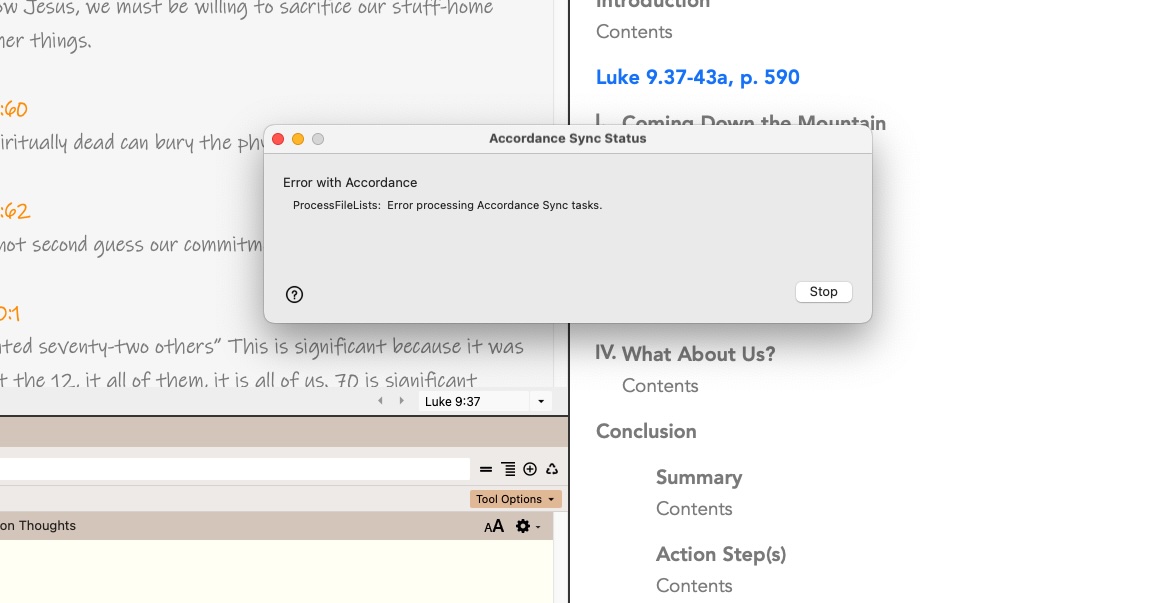
-

Interesting. Sync is still working on my (Intel Chip, Ventura OS) Mac, but I'm getting these kinds of errors on the Windows machine in my office.
0 -
So, I tried syncing again this morning and it worked, but as soon as it was done, Accordance crashed. I tried syncing again after I re-opened Accordance and it correctly said “Noting to sync”.
Here is the crash log:
Accordance Crash Log
Accordance Aleph 14.1.0b3 (14.0.99.06)
CPU: aarch64
MacOS 15.6.1 "Sequoia aarch64"Message: Access violation
Address: $000000010461939CBacktrace:
0 acord 0x000000010461939c acord + 1676188
1 acord 0x000000010461a064 acord + 1679460
2 acord 0x000000010473ec34 acord + 2878516
3 acord 0x0000000104c6adfc acord + 8302076
4 acord 0x0000000104c6a0ac acord + 8298668
5 acord 0x0000000104c5c730 acord + 8242992
6 acord 0x0000000104c5a15c acord + 8233308
7 acord 0x0000000104b2a5b4 acord + 6989236
8 acord 0x0000000104738314 acord + 2851604
9 acord 0x0000000104739ab0 acord + 2857648
10 acord 0x000000010472dbb4 acord + 2808756
11 acord 0x000000010472dfdc acord + 2809820
12 acord 0x0000000104624a48 acord + 1722952
13 CFNetwork 0x00000001a1fc1da8 __79-[__NSCFURLSessionDelegateWrapper task:didCompleteWithError:completionHandler:]_block_invoke + 36
14 libdispatch.dylib 0x000000019c1a3b2c _dispatch_call_block_and_release + 32
15 libdispatch.dylib 0x000000019c1bd85c _dispatch_client_callout + 16
16 libdispatch.dylib 0x000000019c1dab80 _dispatch_main_queue_drain.cold.5 + 812Binaries:
0x0000000004480000 /Applications/Accordance14Aleph.app/Contents/MacOS/acord
0x0000000105628000 /Applications/Accordance14Aleph.app/Contents/Frameworks/SSZipArchive.framework/Versions/A/SSZipArchive
0x000000010584c000 /Applications/Accordance14Aleph.app/Contents/Frameworks/Sparkle.framework/Versions/A/Sparkle0 -
I opened my macBook Pro (2020, M1, 8 gb, Sequoia 15.6.1) to sync and everything worked fine. I changed a setting and re-synced, then re-synced on my Mac mini and it worked fine.
So perhaps this was a glitch????
0 -
What setting did you change? I’m wondering if that would address the issue I’m seeing on Windows.
0 -
Lorinda Hoover I just changed the “automatically adjust to system dark mode” check box.
0 -
I ran another snyc and got the "Process file list" error. I then changed the “automatically adjust to system dark mode” check box in preferences. It then synced beautifully. So, I wonder if the error is happening when there is nothing to sync.
0 -

Thank you for the feedback, we are tracking the "Process file list" error and are working to better handle this server response.
1
Please sign in to leave a comment.
Comments
7 comments