Close button not extended to far right

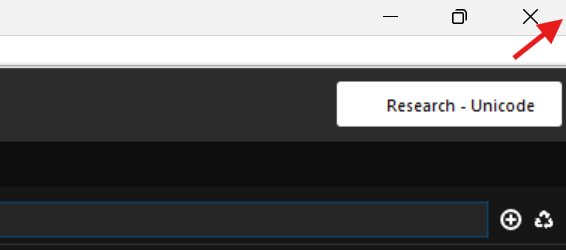
I just wanted to press the close button. Accordance appears to be maximixed, but apparentlythe closing button doesn't extent to the far right. Instead it closed off a windows behind it (Firefox to be exact)
The red arrow is where my mouse is.
0
-

Can you include a link to a screencast of this?
0 -
Please notice the following, Accordance Bible
- I move my mouse to the Close icon
- I simulate, that I wanted to check something first before closing.
- I move my mouse to the far right corner
- It closes Firefox in the background
- I try to click in the corner again, but notice how Accordance become unfocused (greyed out in the top Windows title bar)
The screen is a 4K monitor, if that helps.
0 -
Thanks! I can't reproduce this. What happens if you try with a different workspace?
0 -
Accordance Bible I have tried a different workspace. Same happens. But it might appear it's due to the 4K monitor size rather than 1080p.
0 -
Thanks for the update. Anyone else here with a 4K monitor that can test this?
0
Please sign in to leave a comment.
Comments
5 comments